Virtesoft POSPoint of sale · Distribution Request a demo
Point of sale · Central inventory · Route sales

Know where every unit is, who sold it and what it earned.

Virtesoft POS is a web point-of-sale platform for businesses that sell from a central warehouse, branches and field sellers. Stock moves from headquarters to each seller or point of sale, every sale deducts inventory and prints a ticket, and reports show sales, costs and profit by channel.

4sales channels: HQ, branches, route and external sellers
3price lists per product, applied by seller type
8automatic checks on every route visit
Offlinemobile app, synced without duplicates
pos.yourcompany.com/dashboard
Main dashboard: today's sales, operations, products and low-stock alerts, with every work area one click away.
The problem it solves

Distributed selling breaks spreadsheets.

When stock leaves the warehouse on trucks, in branches and with external sellers, nobody has the full picture. Virtesoft POS keeps one record of every unit from the moment it is loaded until it is sold.

Today
Warehouse counts never match what was loaded on the truck or sent to the branch.

With Virtesoft POS
Every transfer is checked against headquarters stock, recorded and printed as a load ticket.

Today
Field sellers report their sales at the end of the day, from memory or a notebook.

With Virtesoft POS
Each seller sells from their own assigned inventory, and every visit leaves QR, GPS and photo evidence.

Today
You know total revenue, but not which channel, seller or product actually makes money.

With Virtesoft POS
Finance shows revenue, costs and profit per seller, point of sale and period.

Main capabilities

One system for the counter, the warehouse and the road.

Every screen below is the real product, running with a fictional distributor's data.

Checkout

Fast, stock-aware sales with a barcode scanner

Scan a product with a USB scanner, or search the catalogue, and it is added to the sale. Scanning it again increases the quantity. Stock is validated before the sale is saved.

  • Per-item discounts and a global tax or discount adjustment
  • Optional customer, picked from the directory or captured at the counter
  • Sequential folio and stock deduction in a single transaction

Shorter lines at the counter, and no sales of products you don't have.

Recording · Register saleRecording
Six barcode scans: the cart, quantities and totals update with each scan.
Route sales

Delivery routes with verified visits

Plan routes from reusable templates and assign each day to a route seller. At every stop the seller scans the customer's QR code, captures GPS and takes a photo, then records a sale or a reason for no purchase.

  • Alerts for geofence breaks, weak GPS, short stays, reused photos, out-of-order or implausibly fast visits
  • Administrators approve or reject flagged evidence, with notes
  • Weekly routes generated automatically from templates

You see which customers were really visited and what each visit produced.

Routes / Zona Norte · Tuesday
Route day: outcome, evidence assessment, arrival distance and photo for each stop. Stop 3 is held for review.
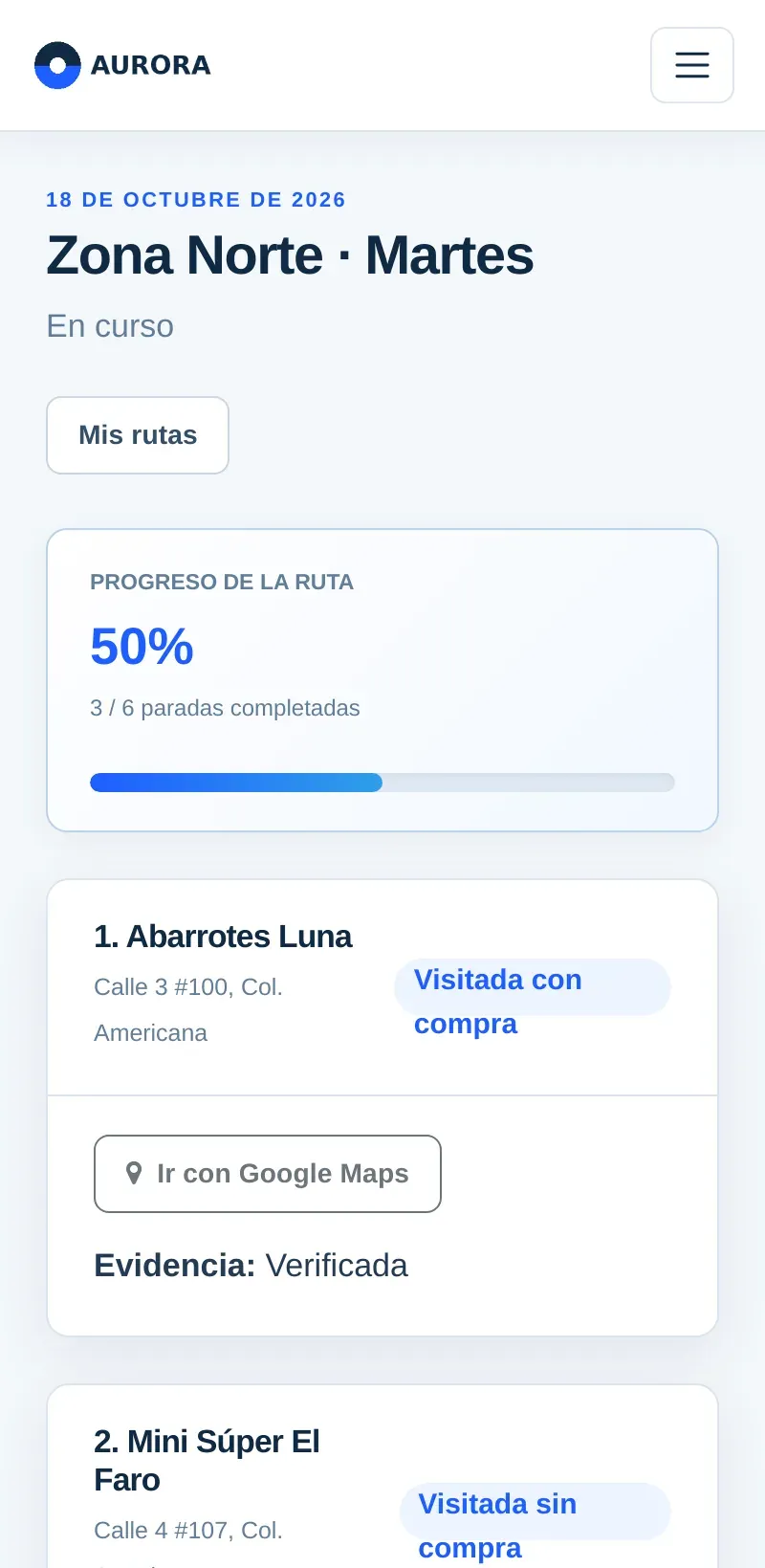
My route (phone)
The seller's view on the phone: progress, stops and actions.
Customers

A customer file that joins counter and delivery

Each customer has contact and fiscal data, the channels they buy through, a verified delivery point with an allowed radius, and a printable visit QR. Their file shows what they bought at the branch and on delivery, and how many visits turned into sales.

  • CSV import with a dry run and row-level errors
  • Orders that reserve stock and become a sale when fulfilled
  • Fiscal file with tax regime and CFDI use for invoicing
Customers / Abarrotes Luna
Customer file: totals by channel, visit conversion and the delivery point with its allowed radius on the map.
Finance

Revenue, costs and profit by channel

Filter by channel, person and period to see revenue from sellers and points of sale, product cost and estimated profit. Cost records per seller and branch, and weekly salary with commission tiers, feed the same view.

  • Sales history by seller, branch, product and period
  • Stock per seller and point of sale with inventory alerts
  • Sales and inventory reports exported to Excel or PDF

Decisions about sellers, routes and products are based on numbers.

Finance / Company finance
Company finance: today's results and the selected period, split by sellers and points of sale.
Tickets

Thermal tickets with your store's identity

Tickets are laid out for thermal printers and carry your logo, store name, RFC, phone, website, address and closing message. With SMTP configured, the same ticket can be emailed to the customer as a PDF.

  • Sale, order, inventory-load and assigned-inventory tickets
  • Reprint any sale or load later
  • Per sale: email, email and print, print only, or no ticket
Ticket VR-00254
A route sale ticket linked to the customer of the stop.

Screens are shown in Spanish, the interface's primary language. An English interface is also available.

More screens

What administrators work with every day.

Routes / Daily and weekly routes
Assign a template, a route seller and a date; follow the progress of every route day.

Daily and weekly routes

Prepare customers with a location and QR, group them in a template, and assign the day. Weekly templates generate their routes automatically.

Typical workflow

From the warehouse to the report.

  1. Administrator

    Set up the business

    Store identity, logo, RFC, currency format, ticket message, SMTP and commission rules.

  2. Administrator

    Load the catalogue

    Products with barcodes, costs, three price lists and minimum and maximum stock.

  3. Warehouse

    Distribute stock

    Load inventory from headquarters to sellers and branches, with a printed load ticket.

  4. Sellers & branches

    Sell anywhere

    At the counter with a scanner, on a route with QR and GPS, or offline on the phone.

  5. Customer

    Receive a ticket

    Printed on a thermal printer, emailed as a PDF, or both.

  6. Management

    Review results

    Sales, profit, stock, commissions and route indicators by channel and period.

Key features

The details that make daily operation work.

Selling

  • USB scanners work like a keyboard: scan and press Enter.
  • Stock check before every sale and on offline sync.
  • Quick customer capture that reuses records by RFC or email.

Inventory

  • Headquarters stock as the source for all loads.
  • Order reservations that hold stock until fulfilment.
  • Permanent movement record for sales, transfers and reversals.

Field operation

  • Visit radius per customer from 20 to 1,000 metres.
  • Mandatory arrival photo (JPG, PNG or WebP up to 5 MB).
  • Route snapshot that keeps history if the template changes.

Products

  • Cost and three prices: public, route seller and external seller.
  • Presentation, barcode, image and stock limits.
  • SAT product and unit keys for electronic invoicing.

Configuration

  • Store identity and logo on screens and tickets.
  • Route evidence rules: GPS precision, minimum stay, photo retention.
  • Online-only or offline-allowed mobile sales.

Platform

  • Web-based: any computer on your network or online.
  • Spanish and English interface.
  • PostgreSQL with verified, checksummed backups.
Business benefits

What changes once it's running.

Less shrinkage, fewer disputes

Every load and sale has a ticket and a record, so differences can be traced to a person, place and date.

Real profit per channel

Costs and prices per channel show which sellers, branches and products deserve more investment.

Verified field work

QR, GPS and photo evidence show which customers were visited and what each visit produced.

Sales without signal

Route sellers keep working offline, and the server validates everything when they sync.

Use cases

Built around how distribution businesses sell.

Distributor with routes

A beverage and snack distributor with six route trucks

Each morning the warehouse loads every truck from headquarters stock and prints the load ticket. Sellers follow their route on the phone, scan each store's QR code and record sales or reasons for no purchase.

Coverage, effectiveness and sales per route, the same day.

Multi-branch retail

A store with a main warehouse and three branches

Branches receive stock from headquarters and sell at the counter with barcode scanners. Low-stock alerts tell the warehouse what to send next.

One catalogue, one set of prices and stock that matches.

External sales force

A producer selling through resellers

External sellers receive assigned inventory at their own price list and record their sales from their session.

You know what each reseller holds and sold.

Target customers

For small and mid-sized businesses that sell in more than one place.

  • DistributorsWholesale food, beverage and consumer goods with delivery routes.
  • Multi-branch retailersShops with a central warehouse that supplies several points of sale.
  • Producers with resellersBusinesses that sell through internal and external sellers at different prices.
  • Growing storesBusinesses outgrowing a cash register and spreadsheets.

Each person sees only their part

Admin

Configures the business, products, prices, users and routes; reviews evidence and reports.

Route seller

Receives assigned stock, follows the route on the phone and records sales and visits.

External seller

Sells from their own assigned inventory at the external price list.

Point of sale

Sells at the counter and checks the branch's own stock.

Integrations and extensibility

Works with the hardware and services you already use.

Hardware and devices

USB barcode scannersThermal ticket printersPhone camera and GPSInstallable mobile app

Services and data

Any SMTP providerPDF ticketsCFDI 4.0 adapterfor your PACCSV customer importExcel and PDF exportPostgreSQLOpenStreetMap maps

For developers

  • JSON endpoints for cash register sessions, payments by method, partial returns, mobile sync and device registration.
  • Scheduled commands for backups, reservation expiry, photo retention and route metrics.
Security and administration

Controls a business owner can rely on.

  • Role-based access plus permissions for fiscal data, imports, route evidence and invoicing.
  • RFC numbers hidden from users without fiscal permission.
  • Route photos served through an authorised view, with every download logged.
  • Photo retention that respects legal holds and keeps hash and metadata.
  • Mobile devices registered and revocable per seller.
  • Audit records for route actions and a permanent inventory movement record.
  • HTTPS, HSTS, secure cookies and content security policy in production.
Why Virtesoft POS

A point of sale that understands distribution.

Most POS products are built for one counter. Virtesoft POS is built for stock that travels.

Inventory per person and place

Headquarters, branches and each seller hold separate stock, with validated transfers between them.

Field sales with evidence

QR, GPS, photo and automatic alerts make route visits verifiable.

Priced per channel

Three price lists per product, applied automatically by seller type.

NeedSpreadsheets and notebooksSingle-counter POSVirtesoft POS
Stock held by each sellerUpdated by hand, often lateUsually one store inventorySeparate inventory per seller and branch, loaded from headquarters
Proof of route visitsSeller's wordNot coveredQR, GPS, photo and review alerts per stop
Prices per channelSeparate price sheetsOften one price listPublic, route and external prices per product
Selling without signalPaper, retyped laterDepends on the productOffline app with duplicate-safe sync and server checks
Profit and commissionsManual calculationSales totalsCosts, profit and tiered commissions per seller
Ways to buy

Choose how you want to run it.

Every option includes initial configuration of your business. Pricing depends on the number of locations and sellers, so we quote after a short demo.

Install

Installation + support

  • On your server or a managed host
  • Branding, store setup and product load
  • Team training and monthly support
Contact sales
Most common

Hosted subscription

  • We host, update and back it up
  • A separate database for your business
  • Mobile app for route sellers
Request a demo
Licence

Business licence

  • For your company and its branches
  • Optional source access by written agreement
  • Custom reports and data migration as extras
Contact sales
Questions buyers ask

Straight answers.

Does it issue CFDI electronic invoices?

It includes the customer's fiscal file, SAT product and unit keys, and a CFDI 4.0 adapter that prevents duplicate stamping requests. Issuing real invoices requires connecting and certifying it with the PAC you choose, which we do as part of implementation.

What hardware do I need?

A computer with a modern browser at each counter. USB barcode scanners and thermal ticket printers work without special drivers. Route sellers use their phone's browser with camera and location permission over HTTPS.

Can sellers really sell without internet?

Yes, if the administrator allows offline sales. The seller downloads data while connected, records operations offline, and the server validates prices, stock and route evidence when the phone syncs. Conflicts wait for review instead of being applied partially.

Does it optimise the order of route stops?

Not today. You set the stop order in the route template; each stop links to Google Maps for directions.

Can I move my existing customers and products?

Customers can be imported from CSV with a dry run first. Product loading and data migration are offered as part of implementation.

See it with your own products

Bring a sample of your catalogue. We'll run a sale, a load and a route with it.

The demo shows the screens your administrators, sellers and branches would use, with your own price lists.

  1. Tell us how you sell: branches, sellers and routes.
  2. Live demo with your products and price lists.
  3. Proposal with the deployment option that fits.
  4. Go live with configuration, data load and training.